

[5 Minutes] How to Start Monitoring with Mackerel

I'm Tsuyoshi Nakagawa from the Operations Management Division of the System Solutions Department
I previously created a test environment
because I wanted to try out Mackerel, so I'm leaving this as a memo for future reference
Create a Mackerel account (takes 2 minutes)
Create a Mackerel account using the following link:
https://mackerel.io/signup
Get the Mackerel agent installation command (takes 1 minute)
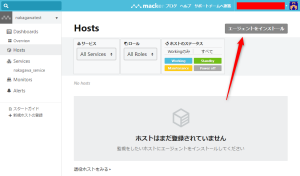
hosts > install agent
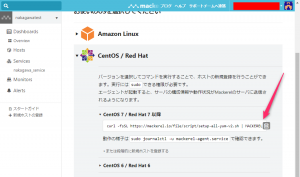
Copy the command.
*This procedure is for Red Hat 7 and CentOS 7.
Other options include "Amazon Linux," "Ubuntu/Debian," and "Microsoft Windows," so
please select the OS that best suits your environment.
Installing the Mackerel agent (takes 1 minute)
Execute the copied command on the server(if copied from the admin panel, the API key will be pre-filled).
curl -fsSL https://mackerel.io/file/script/setup-all-yum-v2.sh | MACKEREL_APIKEY='<APIキー> ' sh .......... ************************************************ Done! Welcome to Mackerel! ************************************************
If you see "Done! Welcome to Mackerel!", the installation is complete!
Start the Mackerel agent (takes 1 minute)
sudo systemctl start mackerel-agent
Once the startup is complete, the host will be added to your admin panel in less than a minute!
Uninstalling the Mackerel Agent (bonus)
sudo yum remove mackerel-agent
If you no longer need it, you can uninstall mackerel-agent with this command
summary
Even if you're a complete beginner, you can start monitoring your servers with Mackerel in just 5 minutes!
And if you don't have an environment yet, you can easily create one by building your own test environment with Vagrant
a free version , so if you're interested, why not try monitoring your servers with Mackerel?




The person who wrote this article
About the author









