

[Trend Micro] Differences between Deep Security as a Service (SaaS version) and Deep Security (license version) [Security]

table of contents
This is Ohara from the Technical Sales Department
we will be talking about Trend Micro's comprehensive server security service , Deep Security
comes in two versions:
the SaaS version "Deep Security as a Service (hereinafter referred to as DSaaS)" and
the packaged version "Deep Security," we will explain the differences between each service system.
The Deep Security we offer DSaaS service, but
it can also be purchased and implemented through marketplaces such as AWS, Azure, and GCP
Differences from DeepSecurity (package version)
The major difference between DSaaS and Deep Security (packaged version)
customers
do not need to own or build their own management server for Deep Security (hereinafter referred to as DSM).
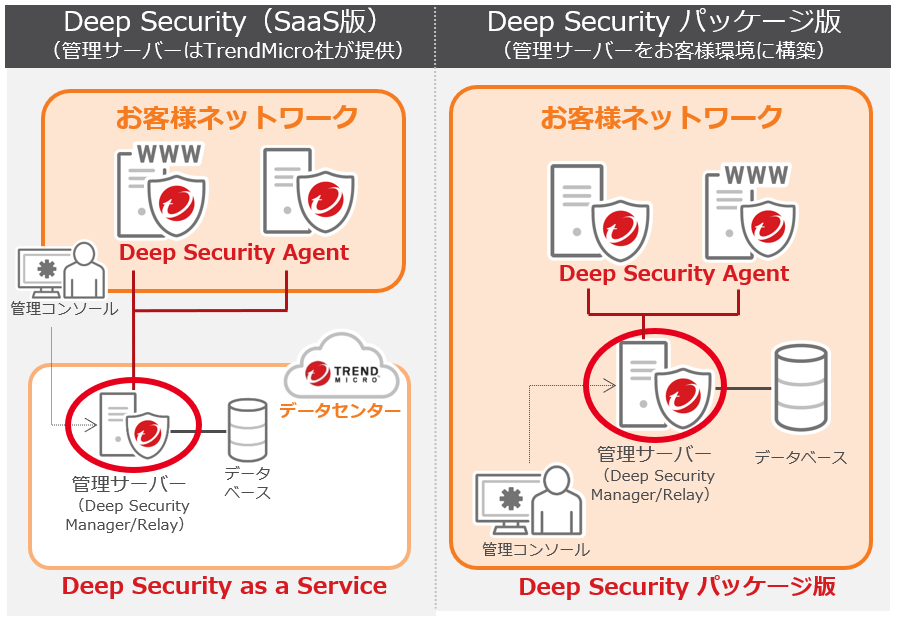
■ DSaaS (SaaS version)
・There is no need for customers to build and operate a management server.
・It can be implemented in units of one seat (one OS).
・A monthly fee service system can support small starts.
■ Deep Security (package version)
・Customization is possible as customers can build their own management server.
・Two types of modules are provided, allowing agentless security to be provided in virtualized environments.
・Depending on the conditions, the packaged version may be cheaper. (However, operation of the management server is required.)
Key points for building DSaaS
Since DSaaS is a SaaS-based security service,
some of the system requirements differ from those of Deep Security (package version) , such as the requirement to ensure a connection to the Internet
■ The server on which the Deep Security Agent (hereinafter referred to as DSA) is installed
must be configured to be able to access the DSaaS Management Manager.
〇 agents.deepsecurity.trendmicro.com:443
〇 relay.deepsecurity.trendmicro.com:443
*Details: http://esupport.trendmicro.com/solution/ja-JP/1104586.aspx
■ When using a proxy server, only Basic authentication is available.
Digest authentication and NTLM authentication are not supported.
■ On the server where you are installing DSA,
the network is temporarily disconnected or the OS network driver
is locked by another program, you may need to restart the OS.
DSaaS system configuration
■ Ports that must be free
○ Smart scan connection from DSA to Global Smart Protection Service: Port 443
○ Communication between DSM/DSR and DSA (for one-way communication from DSA to DSM): Port 443
○ Communication between DSM/DSR and DSA (for one-way or two-way communication from DSM to DSA): Ports 443 and 4118
■ Ports to open as needed
○ Web reputation connections from DSA to Global Smart Protection Service: Port 80
○ Notification emails sent from DSM: Port 25
○ Syslog sent from DSM/DSA: Port 514 (UDP)
○ DNS queries between DSM/DSR and DSA: Port: 53
summary
Since DSaaS is a SaaS type,
the license can be stopped immediately if it is no longer needed, and
there is no minimum license usage period.
We believe that DSaaS has an advantage if you want to easily strengthen server security or reduce operational burden
Please contact Beyond if you have any requests regarding license installation or initial setup of "Deep Security as a Service"
>>>【For inquiries click here】<<<
 0
0 Loading...0



The person who wrote this article
About the author









