

[VSCode] Commands no longer work after updating to version 1.0.0
Version 1.0.0 Released
Visual Studio Code 1.0.0 adds localization for nine languages, including Japanese
Furthermore,if your OS language setting is Japanese, VS Code's language setting will also be set to Japanese.(Confirmed on Windows 10)
This presents one problem:the commands that should be entered into the command palette are also localized into Japanese.
For example, the command to install an extension is:
"Extensions: Install Extension" will change to "Extensions: Install Extension"
If I type something like "ext install", I get the message "No matching commands."

I don't understand this...
So, here's how to change the language settings
Change the language setting from Japanese to English
You can temporarily change the language setting by specifying the locale as a startup argument, or
You can also permanently change the language settings by writing the locale to locale.json
Here we will show you how to create and edit locale.json
Configurelanguage

Open the command palette with [Shift + Ctrl + P], type "language" or similar, and run the "Configure Language" command
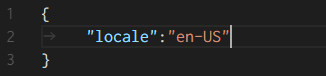
If this is the first time, locale.json will be created at this point and "en-US" will be set as the initial locale value. In other words, the setup is complete at this point
If you want to change the language to something other than English, change the value of locale to one of the locales listed on the Display Language page
The changes will be reflected the next time you start VSCode
The instructions for changing the settings are also written in Display Language , but the command names listed are in English (Configure Language), so they can't be used when the language is set to Japanese




The person who wrote this article
About the author









