

If you get the "Could not open session" error in Vagrant (VirtualBox), suspect your MacType
2016.05.20




My name is Ito and I am an infrastructure engineer
Vagrant is incredibly useful when conducting tests.
We previously introduced how to use it. [Link to previous article:
Building Your Own Testing Environment with Vagrant | Beyond Co., Ltd.]
And here is the error in question
$ vagrant up Bringing machine 'default' up with 'virtualbox' provider... ==> default: Importing base box 'centos67'... ==> default: Matching MAC address for NAT networking... ==> default: Setting the name of the VM: itou_default_1463748220190_31662 ==> default: Clearing any previously set network interfaces... ==> default: Preparing network interfaces based on configuration... default: Adapter 1: nat ==> default: Forwarding ports... default: 22 (guest) => 2222 (host) (adapter 1) ==> default: Booting VM... There was an error while executing `VBoxManage`, a CLI used by Vagrant for controlling VirtualBox. The command and stderr is shown below. Command: ["startvm", "e4d3fa6f-818f-4b03-a359-54e20ec44c38", "--type", "headless"] Stderr: VBoxManage.exe: error: The virtual machine 'itou_default_1463748220190_31662' has terminated unexpectedly during startup with exit code -1073741819 (0xc0000005). More details may be available in 'D:\users\VirtualBox VMs\itou_default_1463748220190_31662\Logs\VBoxHardening.log' VBoxManage.exe: error: Details: code E_FAIL (0x80004005), component MachineWrap, interface IMachine
I was investigating various possibilities, wondering if Vagrant was the culprit,
but then I tried creating and starting a virtual machine with VirtualBox...
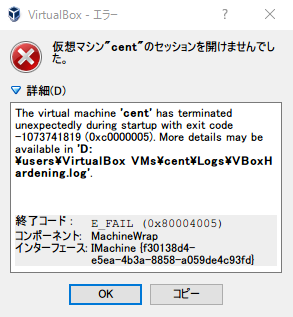
It doesn't work with VirtualBox either. Does that mean Vagrant is not to blame...?
This is what I did:
- Reinstall Vagrant
- Even if I reinstall VirtualBox
- Disable the "Host-Only Adapter" used by VirtualBox
- Disable antivirus software
And after searching, I found that this was the cause... This app is essential for me.
"MacType" Get Mac-quality fonts on Windows! | TRAVELING
It's a software called MacType that makes fonts look nice!
By using it to exclude the VirtualBox process from MacType's targeting, it started up successfully.
Here are the steps to exclude processes in MacType
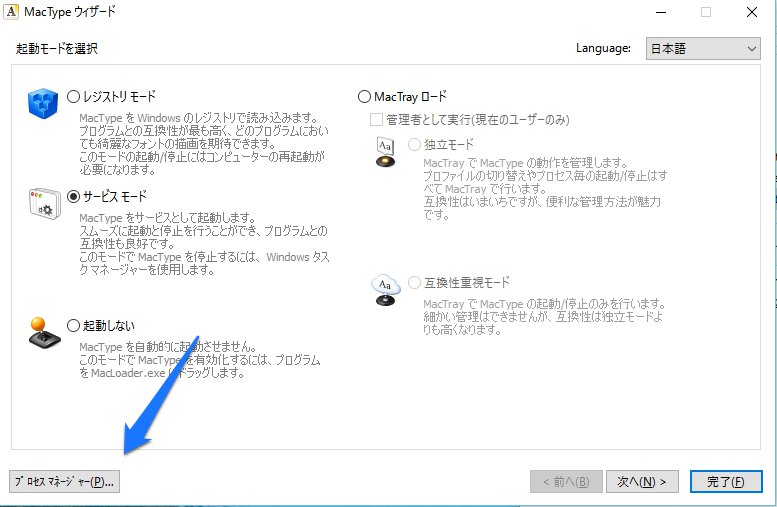
In the MacType Wizard, select "Process Manager" in the bottom left
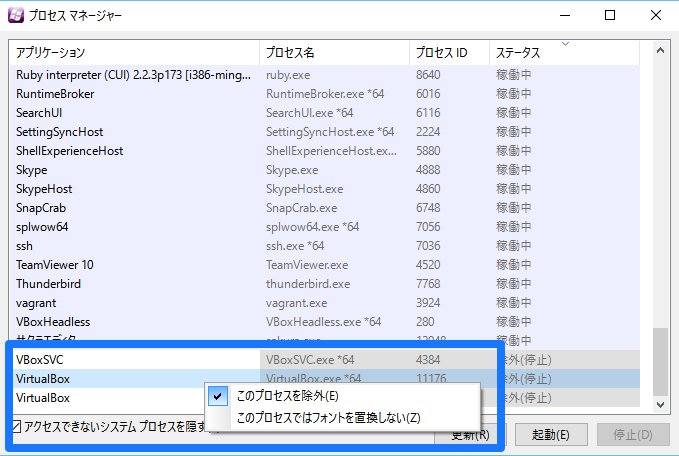
Right-click on the process "VirtualBox" and select "Exclude this process"
That's it!
Now, just close and restart VirtualBox, and it should start up normally.
That was helpful..
The person who wrote this article
About the author









