

Visual Studio Code 1.10 released with tons of new features!

Hello.
I'm Mandai, the Wild team member in charge of development.
Visual Studio Code version 1.10 has been released.
This version is packed with new features, and I'm thrilled that a feature previously only available in Sublime Text has finally been implemented!
The minimap is finally here
A minimap has finally been added, albeit in preview!
Setting "editor.minimap.enabled" to "true" will display the minimap to the right of the editor.
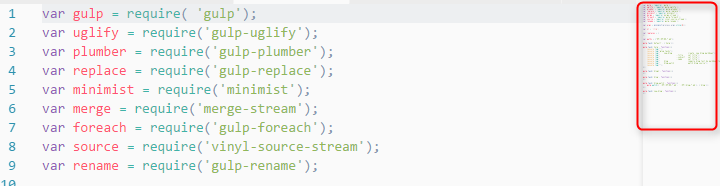
I've enabled it and am using it right away, and it's working great
The minimap also reflects the syntax highlighting settings for the main text, making it quite easy to read.
It seems the minimap size cannot be changed, so we'll have to wait for future updates!
Release of official Linux repository
This was written quite low down in the release notes, so I've moved it up, but I think this information will be of great interest to Linux VSCode users
Repositories for Debian-based distributions and RedHat-based distributions have finally been released, and it is now possible to update VSCode using the apt and yum commands
Until now, Linux users have had no choice but to reinstall the latest version of the package from the homepage, which has been frustrating, but it's good to know that an easy update method has now been provided
It's a bit disappointing that VSCode doesn't update automatically when you start it, like the Windows version, but I think this is a good thing from a Linux culture perspective
Supports drag and drop of selection
You can now move a selection to another location by dragging and dropping it, but only within the same editor
So, this wasn't possible, huh?
It's kind of strange, though.
Copy and paste with syntax highlighting
When copying and pasting syntax-highlighted code, if the software you are pasting into also supports text color settings, you can copy and paste the syntax-highlighted code
If you paste into an application that does not support text color, such as Notepad, the color information will not be pasted
The information that will be copied will be the text color, font, text size, and background color
Auto-generating JSDoc
A new feature has been added that automatically fills in the JSDoc template for JS files
By entering "/**" on the line immediately before the function, the function's arguments will automatically be set to @param
This makes writing JS comments easier!
There are more
Other updates include the addition of keyboard shortcuts for the file explorer and task screen, improvements to debugging, and the ability to open URL links from command line tools, making the update packed with other small improvements
Enjoy a comfortable coding experience with VSCode, which is now even easier to use!
Visual Studio Code February 2017(Release Notes)
That's all




The person who wrote this article
About the author









