

How to install an older version of MySQL

Hello! This is Shimeji from the System Solutions Department.
I transferred to the SRE team in December, and I'm doing my best despite the confusion.
As the title suggests, you might want to install an older version of MySQL, but sometimes the official website doesn't provide a repository.
In such cases, please follow the steps below to install it.
(The following example uses MySQL 5.7.)
Download the RPM Bundle file from the official website
Download the RPM Bundle file for your desired version from the download page.
MySQL Download Page
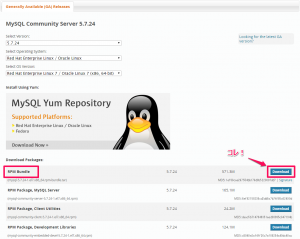
wget https://dev.mysql.com/get/Downloads/MySQL-5.7/mysql-5.7.24-1.el7.x86_64.rpm-bundle.tar
Extracting files
Once the download is complete, unpack it
tar -xvf mysql-5.7.24-1.el7.x86_64.rpm-bundle.tar
Local installation
Install the RPM packages you downloaded locally.
→ Use yum to install the following:
mysql-community-server
, mysql-community-client, mysql-
community-common, mysql-community-
devel
, mysql-community-libs
, mysql-community-libs-compat
yum localinstall mysql-community-server-5.7.24-1.el7.x86_64.rpm mysql-community-client-5.7.24-1.el7.x86_64.rpm mysql-community-common-5.7.24-1.el7.x86_64.rpm mysql-community-devel-5.7.24-1.el7.x86_64.rpm mysql-community-libs-5.7.24-1.el7.x86_64.rpm mysql-community-libs-compat-5.7.24-1.el7.x86_64.rpm
confirmation
Installation successful!
[root@localhost src]# mysql --version mysql Ver 14.14 Distrib 5.7.24, for Linux (x86_64) using EditLine wrapper
summary
I personally had trouble installing the older version of MySQL, so I hope this article will be helpful to someone.
Wishing you all the best for the coming year.




The person who wrote this article
About the author









