

[WordPress] Adding super-simple spam protection to your contact form

This is Yamada from the Systems Department.
Today I'll be talking about WordPress.
WordPress has a form creation plugin called "Contact Form 7" that
makes it very easy to create simple contact forms, but
if you don't take proper precautions, they can easily be used as a platform for spam.
But for those who don't know how to deal with spam, or
who don't want to install too many plugins,
I'll introduce a super easy way to protect yourself from spam.
Here it is↓
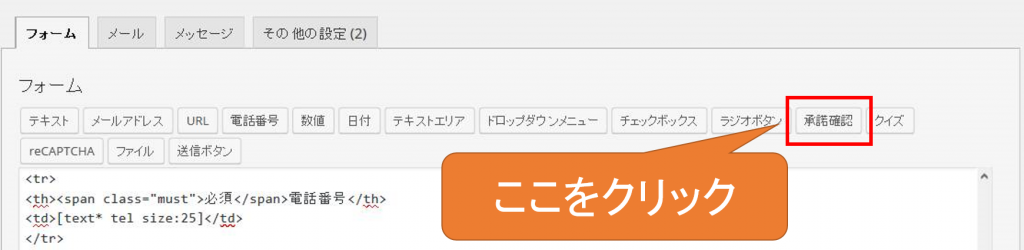
We'll use the "Consent Confirmation" tag in Contact Form 7.
By using this, the form cannot be submitted unless the user checks a box before sending
, which effectively prevents programs that automatically send spam.
It's easy to use; just press the "Confirm Acceptance" button and a dialog box like this will appear.
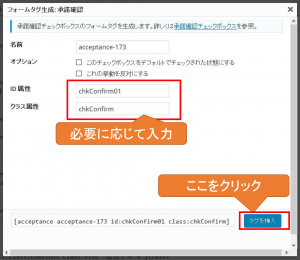
Here, you can set any ID and class (it works even without setting them), and
then press the "Insert Tag" button...
A "Consent Confirmation" tag will be inserted into the form source!
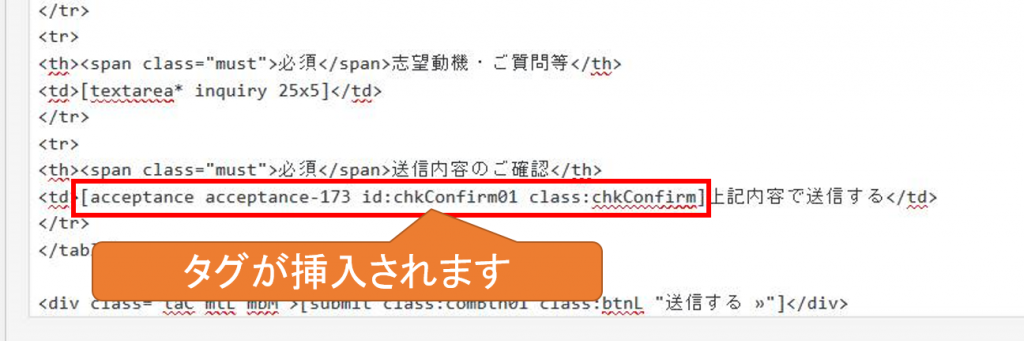
If you don't check the box, you won't be able to press the send button (^^)
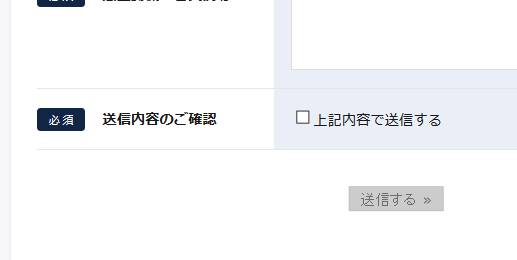
The send button is no longer available!
However, there is one point to note.
While other required fields are subject to input validation,
this "acceptance confirmation" field does not display any input validation error messages by default.
If you're worried that someone might forget to check a box,
enter the following code in "Other Settings".
acceptance_as_validation: on
This will also apply input checks to "Acceptance Confirmation"

An error message appeared!
While it won't completely eliminate all spam,
it's a very effective solution with minimal effort, so please give it a try!




The person who wrote this article
About the author









