

Investigate the status of each server resource with sysstat
2017.04.26





What is sysstat?
This is a monitoring tool for analyzing the load on Linux servers .
It can investigate CPU load, disk I/O usage, memory usage, and network device status.
The sysstat package includes the following commands:
sar, sadc, sadf, iostat, tapestat, cifsiostat, mpstat, and pidstat.
Let's try installing it.
You can install it by running the following command.
# yum install sysstat
# rpm -qa | grep sysstat
sysstat-9.0.4-27.10.amzn1.x86_64
The package is displayed, so it has been installed.
Now let's actually execute each command.
sar
This command allows you to check the system's operating status
# sar [options] acquisition interval acquisition count
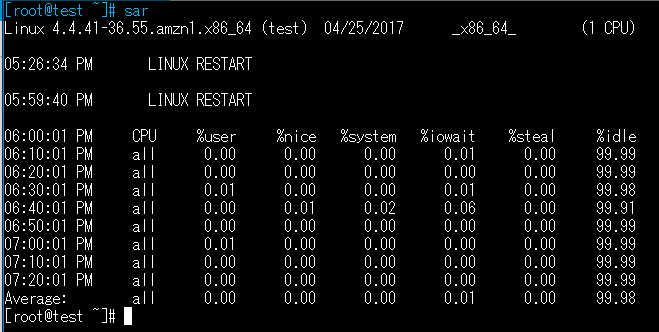
The first time I ran it without any options, the results were displayed in 10-minute intervals
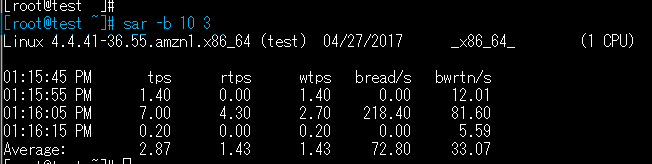
The second time, I ran the program to display the iowait status three times for 10 seconds each.
Similar to the first execution result, the average value at the time of command execution is displayed on the last line.
In addition, by specifying options, you can also check the CPU status and memory usage
# Check CPULA status sar -q # Check memory usage sar -r
vmstat
This is a command that allows you to check memory, SWAP, disk I/O, and CPU usage
# vmstat [options] acquisition interval acquisition count
The "-t" option, which displays the acquisition time, is used to display the resource status three times per second

mpstat
This command allows you to check CPU usage
# mpstat [options] acquisition interval acquisition count
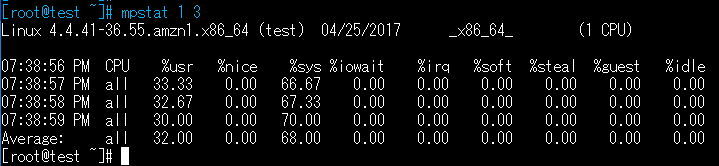
Compared to the sar and top commands, it displays the CPU processing time for each, such as %irq (hardware interrupt), %soft (CPU for software interrupt), and %guest (CPU running virtual servers)
Conclusion
If there are any problems or failures on the server , you can
use the top command or ps command
Checking the load average
is a way to investigate the cause of server load.
For understanding normal load conditions and long-term resource status, monitoring tools like Zabbix are suitable.
However, we introduced sysstat here as one of the methods for investigating when a failure occurs.
Installing sysstat will allow you to execute all the commands introduced here, including the ones mentioned.
Try using it in conjunction with commands that put a load on the server to check resource status, and
experiment with different options.
Thank you for reading this far.
The person who wrote this article
About the author









