

This tool is so useful! It improves the efficiency of your Excel work

Nice to meet you, I'm Sakashita from Beyond!
I'm sure there are many people who use Excel in their daily work
For those who use it every day, even a simple operation
If you do it multiple times, it takes up a lot of time..
"I don't want to waste time working on Excel!"
"I want to improve my work efficiency!"
For those of you looking to significantly improve your work efficiency , I'd like to introduce an add-in tool !
First of all, what is an add-in?
An Excel add-in is a tool that enhances Excel
In addition to the add-ins that originally came with Excel, there are additional add-ins that can be used with Excel
the Microsoft Download Centerif needed.
Add-ins are not available out of the box by default in Excel
First, you need to install the add-in and enable it if necessary
Enable the add-in
* Newly installed add-insare automatically activated upon registration, so this stepis not necessary.
-
-
Click the "File" tab and then "Options."
-
Select "Add-ins" in the left pane and click the "Settings" button at the bottom of the dialog box
-
Check the add-in you want to enable and click "OK"
-
Now that you understand how to activate it,let me introduce some recommended add-in tools!
1. " RelaxTools Addin " delivers the functionality you've always wanted.

This add-in installs over 250 features that make Excel more convenient
The main features are as follows!
- Grep functionality within Excel workbooks.
- Convert Excel tables to HTML (Excel can be used as a designer).
- Regular expression search and replace for text within shapes or cells.
- 2007 compatible preview screen display
. - Open workbooks with the same name (read-only).
- Check for duplicate cells, character count, and byte count
. - Check for half-width/full-width characters, numbers, letters, alphanumeric characters, dates, and major check digits.
- Trim cells, insert text, delete text, remove line breaks, etc.
- Convert uppercase/lowercase, hiragana, katakana, full-width/half-width characters, etc.
- One-button functions such as transposing rows and columns and merging vertically.
- Emphasis shapes (rectangles, ellipses, arrows, speech bubbles).
- Adjustment functions such as image size and straightening arrows.
- Paste the workbook name to the clipboard and open the current workbook's location in Explorer.
- 2003 compatible color palette
. - Move the selection range up, down, left, and right.
- Manage sheets (sort, select, show/hide, delete sheet names)
. - Split workbooks into individual sheets, merge multiple workbooks into one.
- Automatically set the cursor to A1 when saving.
(Partial quote:http://software.opensquare.net/relaxtools/about/)
If you're not sure what to do, just install this and you'll be fine!
Download here:RelaxTools Addin
2. " Clip Stamp " allows you to easily create electronic seals.
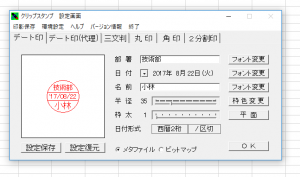
There are probably many occasions when you will need to stamp documents in the office, such as for confirmation stamps
This clip stamp makes it easy to create your own stamp!
It comes with five types of stamps: date stamp, proxy stamp, three-character stamp, round stamp, square stamp, and two-part stamp
You can make detailed settings such as font and frame color
Download here:Clip Stamps
3. "Office Tab" allows you to switch between tabs instead of windows
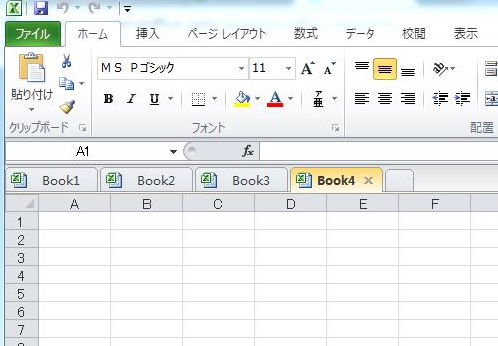
In daily work, it's common to have many Excel windows open at once
However, if you open multiple apps, you have to switch between them multiple times, which can be quite a hassle
This tool allows you to work with multiple files by switching between tabs
This will lead to increased business efficiency!
This also supports Word and PowerPoint
*Currently, Office Tab appears to be a 30-day trial version
Download here:Office Tab
Improve your Excel skills with add-ins!
There are so many useful features like this, you'd be missing out if you didn't use them!
Let's make effective use of the tools introduced here to improve the efficiency of our work!




The person who wrote this article
About the author









