

I created an extension that displays my daily schedule in the side panel of my browser
SideTimeTable Release Announcement
Hello, this is badfalcon.
I've just released a Chrome extension called "SideTimeTable" as a personal project. SideTimeTable is a tool that intuitively displays your daily schedule in your browser's sidebar. I developed this extension hoping to make daily schedule management easier, allowing you to see everything at a glance without the hassle of switching tabs.
The idea was born from this problem
"I forgot about the meeting again..."
I've had this experience many times myself. When I'm concentrating on my work, I forget to check my calendar. Then I found out that a new Chrome extension called SidePanel had been added, and I had an idea: "If I use this, I might be able to always see my schedule while I'm working."
SideTimeTable was born from the simple idea that "If you use Chrome, it would be convenient to have a Today Timeline in the sidebar." It works with Google Calendar, and schedule updates are automatically reflected. It also has a function that allows you to add personal schedules that are not registered in the calendar locally
Main features of SideTimeTable
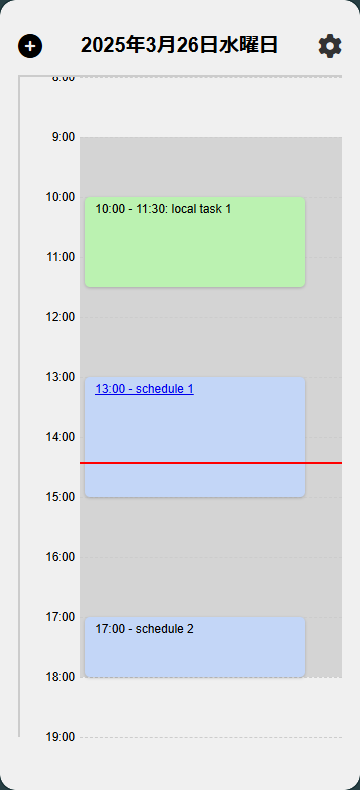
Actual screen
- Intuitive Side Panel Display:
A side panel, always visible on the right side of your browser, displays today's events in chronological order. Its simple design allows you to see your entire schedule at a glance. - Google Calendar Integration
: By integrating with your existing Google Calendar, appointments are added and changed in real time, allowing you to easily check the latest information. - One-click access to Google Meet meetings:
For scheduled Google Meet meetings, you can join directly by simply clicking on the event in the side panel. This eliminates the hassle of searching for the meeting URL, allowing for smooth and seamless participation. - Even events not registered in
your local event management calendar can be added and edited directly on the spot. You can also record urgent notes and ideas without missing anything - customizable settings,
options to adjust settings such as working time and display colors to your liking, you can create a timeline that is tailored to your preferences and easy to use.
What I felt after actually using it
Since I started using this extension on a daily basis, I rarely miss any appointments. My appointments are always displayed in the side panel while I'm working in my web browser, so I no longer have to panic when I remember I have a meeting
Another unexpected benefit is that the remaining work time for the day is now visible, making it easier to plan what tasks to work on in my free time. It also seems to have the effect of naturally raising awareness of how I use my time
What's particularly convenient is that if a Google Meet meeting is scheduled, you can join the meeting directly by simply clicking on the event in the side panel. Previously, a few minutes before the meeting, I would have to reopen my calendar and wonder, "Where's the URL again?", but now I can connect to Meet with just one click, which lowers the psychological hurdle of joining a meeting
Strengths of SideTimeTable
In fact, there are surprisingly few extensions that display information in Chrome's SidePanel. As this is a relatively new Chrome feature, there is still room for development in this area. SideTimeTable is a pioneer in this area, proposing a new way of managing schedules in the browser
The side panel is a great way to view your schedule without interrupting your workflow, as it places information in a convenient location that's always visible but not intrusive. This is especially useful when you have a busy day with many meetings or a project with a deadline looming
How to use and install
SideTimeTable is already available on the Chrome Web Store.
You can install it immediately by clicking the "Add to Chrome" button on the Chrome "SideTimeTable" page.
Detailed instructions and screenshots are available on the official landing page (https://badfalcon.github.io/SideTimeTable/), so please check it out. (The appearance will be improved in the future…)
The story behind the development
The initial development of SideTimeTable was driven by the desire to bring the idea to life as quickly as possible, starting from the moment the idea first came to me.
By utilizing AI tools (ChatGPT before Cline became popular) as a supplement, we were able to efficiently proceed with coding and complete the initial version in a short period of time.
However, the most difficult part was the application process for Google's OAuth authentication. Because users' calendar information is confidential, we had to prepare a page with a detailed explanation of the purpose of use and a disclaimer. Our application was rejected several times, and we realized for the first time that the screening process was much stricter than we had expected
I was surprised that such a simple feature required so many steps, but I understood that it was an important step to protect user privacy. It was only after learning so much that we were able to overcome these processes and settle on the current form
Future outlook
This release is just the first step. There's so much we want to do, and so little time! We're considering the following improvements and new features to make the tool even easier to use, while incorporating your feedback
- Multiple Calendar Display Support:
Currently, only the schedule of the main calendar can be displayed. We will add support for switching between multiple calendars, such as work and personal calendars. - We plan to add an
alert and reminder function that will notify you before your scheduled appointment starts, further preventing you from missing appointments - Adding notes to empty spaces:
This feature allows you to add simple notes to your calendar's free time slots, making it easier to manage even small tasks. - Enhanced display customization options:
We've added more detailed customization options for colors, fonts, display formats, and more, improving usability. - Bug fixes and stability improvements:
Based on user feedback, we will continuously work on fixing bugs and improving operational stability. - Support for Chromium browsers other than Google Chrome:
We will continue to improve the system so that it can be used comfortably with Chromium-based browsers other than Google Chrome, such as Sidekick.
About Contributing
SideTimeTable is an open-source project released on GitHub.
We would be very happy if anyone could contribute their opinions, suggestions for improvements, or suggestions for new features.
If you are interested, please visit badfalcon/SideTimeTable
For inquiries, please use the Issues section on GitHub.
summary
The Chrome extension "SideTimeTable" was developed to solve the everyday problem of forgetting scheduled meetings
With an intuitive side panel display, Google Calendar integration, one-click access to Google Meet, local event management, and a wide range of customization features, it provides an environment where you can easily check and participate in events while working on your PC
As one of the few extensions that utilizes Chrome's SidePanel function, we hope to propose a new way of managing your schedule. It is still in development, but we plan to continue evolving it into an even better tool, so please give it a try!
Please install SideTimeTable from the Chrome Web Store and try it out
We look forward to your feedback and contributions, and we'll continue to improve the app to make it easier for you to manage your daily schedule




The person who wrote this article
About the author









