

[Zabbix 3.4] Suppressing alerts on specific days of the week with triggers
2019.08.14
 0
0 



Hello
My name is Miyazaki and I work in the Operations Management Division of the System Solutions Department
Today I would like to introduce a trigger that prevents alerts from being generated on specific days of the week in ZABBIX 3.4.
Nakagawa from the Technical Sales Department has also written an article titled Setting monitoring exclusion times for ZABBIX 3.4,
Trigger function for specific days of the week
The trigger function to specify a specific day of the week is "dayofweek"
The following was described in Zabbix Documentation 2.2:
https://www.zabbix.com/documentation/2.2/jp/manual/appendix/triggers/functions
1 to 7, with
1 being Monday
, 2 being Tuesday
, and
7 being Sunday
.
Below are some examples of trigger expressions:
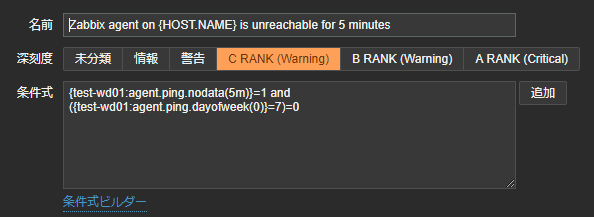
The trigger condition expression is as follows:
{test-wd01:agent.ping.nodata(5m)}=1 and
({test-wd01:agent.ping.dayofweek(0)}=7)=0
The upper conditional expression uses the nodata function to check whether the data "agent.ping" from the host "test-wd01" has not responded for 5 minutes.
The lower conditional expression uses the dayofweek function to check what day of the week the data "agent.ping" from the host "test-wd01" is on.
These are connected with "and".
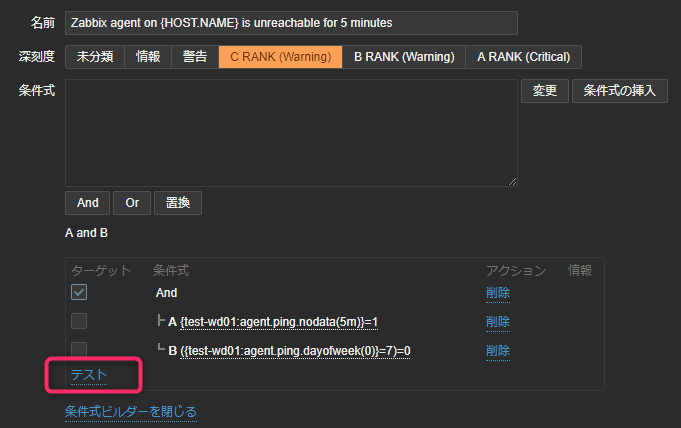
Let's actually test it using the Conditional Expression Builder.
Select Conditional Expression Builder and click Test.
If there is no response for 5 minutes on Monday
, {test-wd01:agent.ping.nodata(5m)}=1
will return 1, indicating that there has been no response for 5 minutes.
({test-wd01:agent.ping.dayofweek(0)}=7)=0
will select 1 to indicate Monday.
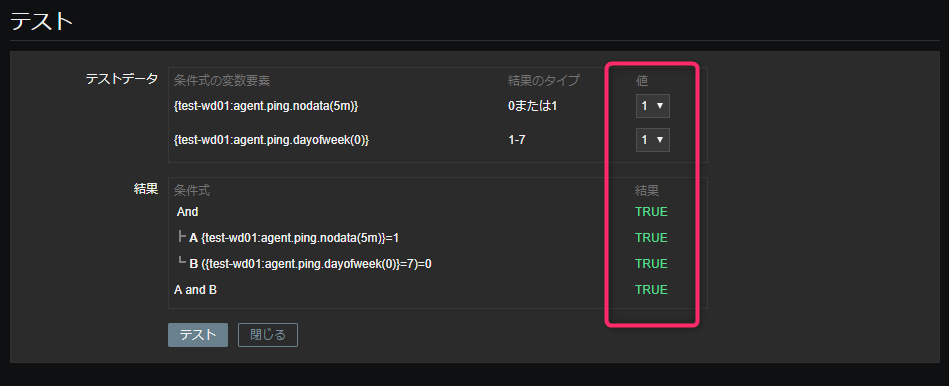
The conditions are connected with and, and both are TRUE, so an alert will be triggered.
If there is no response for 5 minutes on Sunday,
{test-wd01:agent.ping.nodata(5m)}=1
will return 1, indicating that there has been no response for 5 minutes.
({test-wd01:agent.ping.dayofweek(0)}=7)=0
will select 7 to indicate Sunday.
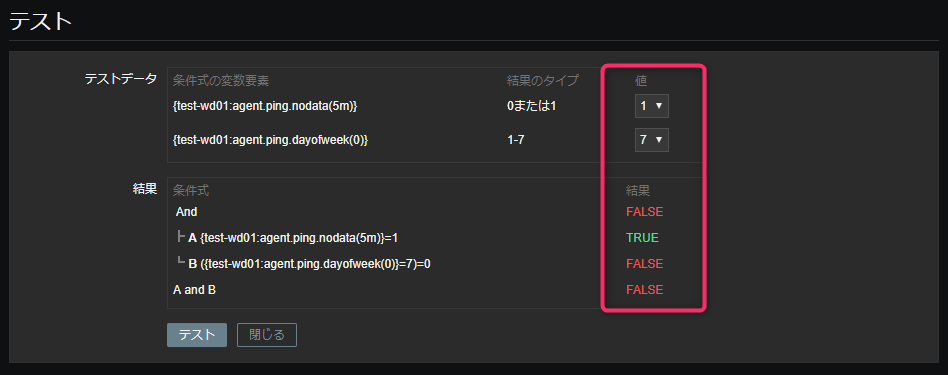
The condition expression for dayofweek is now FALSE.
Because the conditions are connected with and, an alert will not be triggered unless both are TRUE.
Trigger Description
{test-wd01:agent.ping.dayofweek(0)}=7In
the above example, if the value entered for dayofweek is 7 (Sunday), the result will be TRUE.
({test-wd01:agent.ping.dayofweek(0)}=7)=0However
, if you enclose it in () and add =0 at the end, it means that the value enclosed in () is negated.By
doing this, if the value entered in dayofweek is 7 (Sunday), it will return FALSE.
summary
As mentioned in the links along the way, there are many trigger functions, so it seems possible to write complex conditions.
I'll also introduce any interesting conditions I come across.
That's all
0 Loading...0
The person who wrote this article
About the author









