

[Training Review] This is what happens when you use Google Cloud with the same feeling as AWS
Introduction
Hello, nice to meet you. I'm Paru, a first-year infrastructure engineer in the Systems Solutions Department, graduating in 2024.
I'm a humanities major with a literature degree, but I'm working hard every day to become a full-fledged engineer!
This time, as a recap of the training,
I'll share some of the difficulties I encountered when I, someone with no prior IT experience, built a server using Google Cloud in a role-playing exercise after learning about AWS in the classroom portion of the training.
For more details on the training content, please see the previous article below 👀
[Biyoben #41] We held a study session on the contents of training for new graduate engineers!
Please also take a look at our previous articles on AWS, which are extremely easy to understand for beginners
[AWS Beginners] A quick explanation of what Amazon VPC is!
Premise: A rough summary of terms
Even though the services are similar, AWS and Google Cloud use different names.
Please keep this in mind as you read on.
| AWS | Google Cloud | meaning |
| VPC | VPC network | Virtual Network |
| Availability Zones | zone | Geographically distant data centers |
| Security Groups & Network ACLs | Firewall Rules | Communication control function |
| Elastic Load Balancing | Cloud Load Balancing | Ability to distribute received traffic across multiple targets |
Network Configuration
Now, let's look at the first stumbling block: the differences in network configuration.
AWS and Google Cloud have significantly different network configurations.
See below.
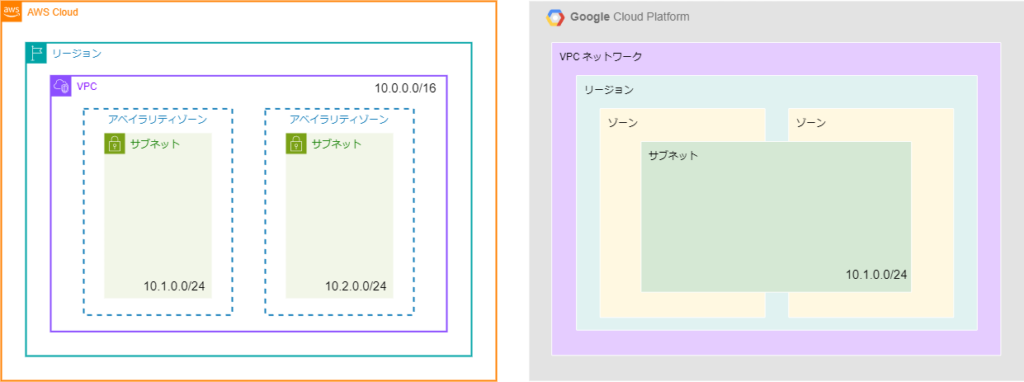
AWS network configuration
In AWS,VPCs exist within regions.
Additionally, IP address ranges must be added to both the VPC and the subnet
The subnet's IP address range is allocated by extracting it from the VPC's IP address range.
Google Cloud Network Configuration
In Google Cloud, regions exist within a VPC network
The difference lies in the fact that Google Cloud's VPC itself is a global entity, and regions are specified within it.
Additionally, IP address rangesadded only to subnets.
In the case of Google Cloud, network expansion and design changes can be made simply by creating a new subnet.
Bonus: Database placement
Incidentally, there are differences not only in network configuration but also in how databases are deployed.
AWS builds RDS within the VPC created by the user
However, with Google Cloud, Cloud SQL is built not within the user's VPC, but in a VPC dedicated to Cloud SQL . Therefore, VPC peering is necessary to connect the user's VPC and Cloud SQL.
If you set it up the same way as AWS, you will be confused because the database and VPC cannot be associated!
Differences in communication control methods
Whether you want to block access from aggressive IPs, or restrict access to specific IPs in a development environment, the way you control
network traffic varies depending on the server.
Here, we'll compare the differences in network traffic control methods between AWS and Google Cloud.
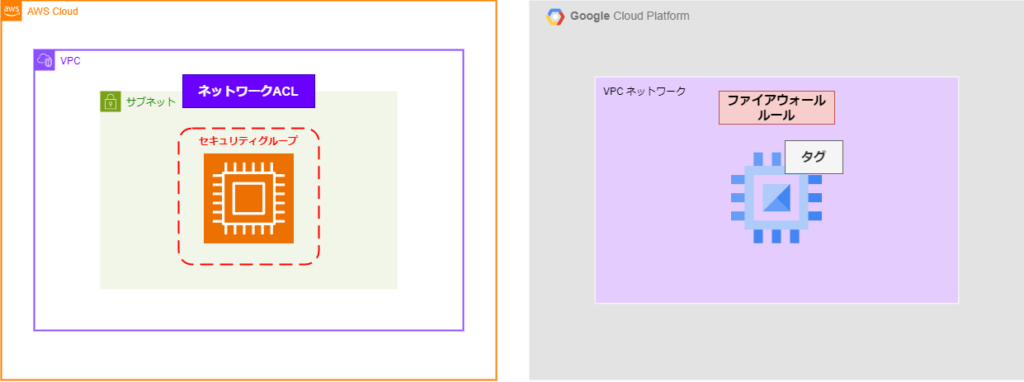
AWS Security Groups and Network ACLs
In AWS, you can control communication on an instance-by-instance basis using security groups and on a subnet-by-subnet basis using network ACLs
A security group allows you to set rules that grant access to individual resources , such as EC2 instances
It can be used to manage inbound (receiving) and outbound (sending) traffic between AWS resources, or between resources and clients, thereby enhancing security.
Network ACLs , on the other hand, allow you to set rules that deny access to subnetsするルールを設定できるものです。
Because you can deny access to specific IPs or ports, you can flexibly configure network security policies.
Google Cloud Firewall Rules
Google Cloud's communication control can be configured solely through firewall rules
Unlike AWS, the services handled do not change depending on the resource or network.
Inbound (receiving) and outbound (sending) settings, as well as allow/deny settings, can all be created using firewall rules.
Additionally, if you want to apply rules to resources, you use tags
If you want to apply a firewall to resources such as instances, you can set tags when creating firewall rules and then assign the tags to the target resources to apply the rules.
I remember during my training, when I was fumbling around and didn't understand how to use tags, I ended up creating a huge number of rules, which was a real hassle.
Load Balancer Types
A load balancer is a service that distributes the load across multiple servers by linking them together.
AWS offers four types of load balancers , while Google Cloud offers a whopping ten
Incidentally, the service names are also unique: AWS uses Elastic Load Balancing , while Google Cloud uses Cloud Load Balancing
Here, we will compare the load balancers of AWS and Google Cloud and look at the reasons for the difference in the number of types.
The table below shows the types of load balancers offered by each platform.
| AWS | Google Cloud |
| Application Load Balancer (ALB) Network Load Balancer (NLB) Gateway Load Balancer (GLB) Classic Load Balancer (CLB) |
Application external global load balancer, Application external regional load balancer, Application internal global load balancer, Application internal regional load balancer, Network external , Network external regional proxy load balancer, Network internal global proxy load balancer, balancer, Network external regional pass-through load balancer, Network internal regional pass-through load balancer |
Elastic Load Balancing (AWS load balancer)
There are several types of AWS load balancers:
Application Load Balancer (ALB) ... Supports HTTP and HTTPS traffic.
Network Load Balancer (NLB) ... Distributes high-volume access with low latency.
Gateway Load Balancer (GLB) ... Allows extension of third-party virtual networks.
Classic Load Balancer (CLB) ... Similar to ALB and NLB, it distributes load across multiple instances, but is the only one that supports EC2-Classic networks.
You can choose an AWS load balancer from the above options based on your needs
Cloud Load Balancing (Google Cloud load balancer)
Next, I'll briefly explain Google Cloud's load balancers.
Unlike AWS, where you choose from four different load balancers, with Google Cloud, you select the appropriate one based on your specific needs. You
can configure the load balancer by following the steps below.
Application-based or Network-based
Application-based: Performs load balancing at the application layer (receives requests at Layer 7 of the OSI reference model)
Network-based: Performs load balancing at the network layer (receives requests at Layers 3 or 4 of the OSI reference model)
External or Internal
External…Receives traffic from the internet
Internal…Receives traffic only within the VPC
Global or Regional?
Global… Server resources are deployed globally, and the settings are reflected for server resources located at edge PoPs (points of interest that connect to the Google Cloud network from the internet).
Regional… Servers are deployed within a specific region, and the settings are reflected only within that region.
Proxy type or pass-through type (network type only)
Proxy type: Receives communication requests from clients and can perform processing such as rewriting headers or redirecting
. Pass-through type: Allows communication from clients to pass through as is.
By following this step-by-step setup, you can set up load balancers such as an "application external global load balancer" or an "internal network regional pass-through load balancer," giving you a total of 10 different types to choose from
The sheer number of options makes it difficult to get started, and I was frustrated by the sheer volume during training. However,
looking at it again, I think the ability to select a load balancer based on detailed conditions is a definite advantage of Google Cloud load balancers.
summary
For my memorable first blog post, I shared my experiences as an IT novice who, after dabbling in AWS, encountered some difficulties building a server using Google Cloud. It was a
great opportunity for me to review my training and relearn about AWS and Google Cloud✨
I hope this blog will be helpful to IT beginners who are just starting to explore cloud computing!
Reference Websites:
Comparing AWS, Azure, and GCP - IaaS Edition
AWS/Azure/GCP Service Comparison Network Edition
Understanding GCP Network Security from Scratch!
Configuring Replication from MySQL on AWS EC2 to GCP Cloud SQL
Understanding the World of Google Cloud Load Balancers from the AWS Perspective
[AWS Introduction] What is AWS ELB? Introducing Load Balancer Types, Features, and Pricing
Understanding Google Compute Engine Firewalls #gcpja
How to Use AWS ACLs and Security Groups




The person who wrote this article
About the author









